On building the infrastructure for asking the same question twice
You can’t improve what you can’t reproduce. That’s the problem with most AI evaluation today: someone runs a prompt, gets a result, and reports it. But when the model changes — a new quantisation, a parameter update, a different provider — there’s no clean way to ask the same question again and compare the answers.
I built a “test suites system” for the Mythic AI Observatory this week, and it’s worth examining because the interesting part isn’t the code. It’s the shape of the problem, how an external review changed the architecture, and what we lose when we skip this step.
The problem was running a series of tests without a memory of all of them as a group. The observatory already had a single-prompt test runner — type a prompt, pick a model, see the trace. That’s useful for ad-hoc probing, but it has a fatal flaw: it’s stateless. There’s no record of what was asked, when, or with what configuration. You can’t compare models on the same prompts. You can’t detect regression after a model update. You’re running experiments without a lab notebook.
The obvious solution is a saved set of prompts you can re-run on demand. The less obvious part is making it actually useful — which means run history, model comparison, and an architecture that doesn’t collapse when you have hundreds of runs.
A test suite is a named collection of prompts with optional categories and notes. You create one, add prompts (or import them from the existing diagnostic probes), and then run it against one or more models. The system tracks every run — which prompts succeeded, which failed, how long each took, and which trace IDs were generated.
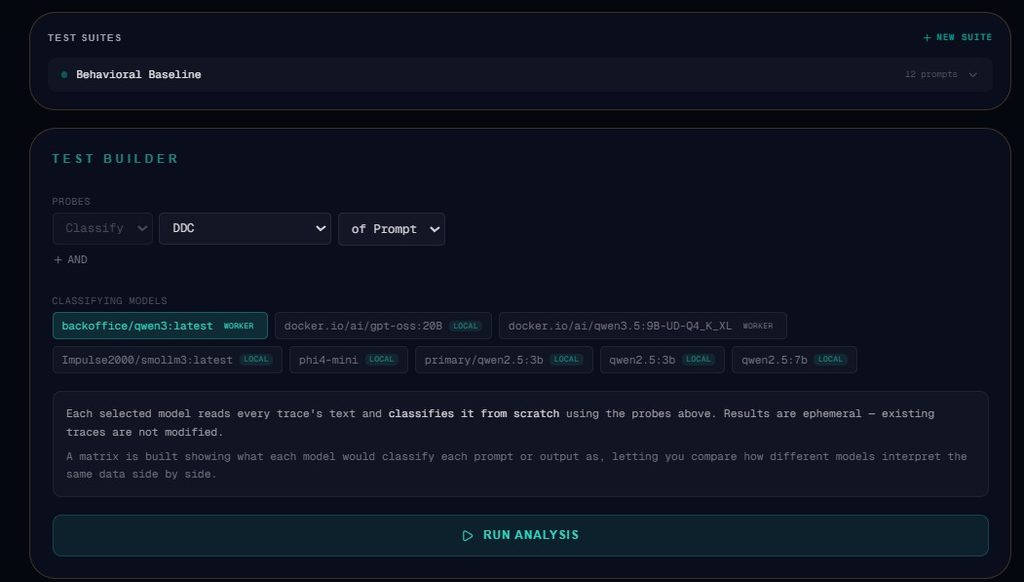
The frontend (`TestSuiteManager.tsx`) presents this as a card-based interface: each suite is a card showing prompt count, last run status, and quick actions. Click into a suite, you see the full prompt list, run history, and the option to start a new run. During execution, a live progress bar shows completed/failed counts.
The backend uses an `asyncio.Semaphore(2)` to limit concurrency across all prompts and models in a run — you don’t want to hammer your infrastructure with 50 simultaneous requests when you’re running a 10-prompt suite against 5 models.
The initial plan was designed with OpenCode. As per usual, I like to get one of my other AIs to perform a plan review. When I shared the initial plan with Gemini, it flagged something I’d overlooked: run history bloat. My first draft embedded all run data inside the suite’s single JSON file. Gemini pointed out that a suite with hundreds of runs would produce a multi-megabyte file that gets rewritten on every completed prompt. More importantly, if the server crashes mid-run, you lose all progress because the entire file is the unit of write.
The fix was straightforward but important: separate suite definitions from run data. Each suite gets a `{suite_id}.json` file with just metadata and prompts. Each run gets its own file in a `runs/` subdirectory. This gives you crash recovery (write after each completed prompt, not at the end of the run), efficient listing (load suite metadata without loading all run history), and clean deletion (remove a suite and its runs directory in one operation).
Gemini also flagged the need for a persistent run state indicator — the ability to see a suite card marked “running” even after a page refresh — and a configurable concurrency limit. Both were easy wins once the storage was right.
Reviewing the implementation after the fact, a few things stand out:
The seed strategy works but is implicit. When the system first starts, it seeds a “Behavioral Baseline” suite from `diagnostic_probes.json` — 12 prompts covering tone, structure, constraint adherence, genre, ambiguity, reasoning, honesty, and persona defaults. This is useful, but the seeding happens inside `list_suites()`, which means the first API call creates the suite. That’s a side effect in a read operation. A cleaner design would be a dedicated `/api/suites/seed` endpoint or a startup hook.
The concurrency limit is global, not per-model. The semaphore allows 2 simultaneous executions across all models. If you’re running a suite against both a local model and a remote API, they share the same pool. That’s conservative (which is good for not crashing your infrastructure) but means a slow local model blocks fast API calls. A per-model or per-provider semaphore would be more nuanced.
The progress persistence writes on every completion. For a 10-prompt suite against 5 models, that’s 50 disk writes during a run. The writes are small (a few hundred bytes each), and they’re in a local directory, so the I/O is negligible. But if the system were to support remote storage or network filesystems, this would need batching. Worth noting as a scaling consideration.
The frontend component is self-contained but not reusable. `TestSuiteManager.tsx` is a complete, standalone component with its own state management, API calls, and rendering. That’s good for isolation but means any future component that needs to display suite data (say, a dashboard widget showing recent suite runs) would need to duplicate the API logic. A `useSuites()` hook would have been the idiomatic Next.js approach.
The benefits
The immediate benefit is reproducibility. You can run the same 12 behavioral probes against one model today, update the model tomorrow, and run them again. The traces are linked to the suite and run, so you can compare outputs side by side.
The secondary benefit is regression detection. If a model update changes the system’s behavior on a specific prompt, you’ll see it in the run history. The observatory already tracks entropy and confidence — now you can see how those metrics shift across runs on the same prompt set.
The tertiary benefit is auditability. Every run is timestamped, model-tagged, and linked to trace IDs. If you need to explain to someone what happened during an evaluation, you have a paper trail.
The less obvious benefit is the behavioral baseline itself. The 12 diagnostic probes aren’t random — they test specific failure modes: tone consistency, constraint adherence, ambiguity handling, reasoning under uncertainty. Having a saved set that exercises these failure modes means you’re not just testing whether the model works, you’re testing whether it works where it tends to break.
What’s next
The test suite infrastructure is in place. The next steps are:
1. Trend visualisation — plot entropy, confidence, and hallucination metrics across runs to see drift over time
2. CI integration — run suites automatically on model updates and flag regressions
3. Cross-observatory comparison — share suites between observatory instances to validate findings across different setups
The reproducibility infrastructure is the boring part. It’s also the part that makes everything else trustworthy.